


Photography 101
 Jan 16, 2012 | 10:15 AM
#72
Thread Starter
| Teamspeed Pro
Joined: May 2008
Posts: 15,199
From: MidEast


OK.... lets bump this thread 
Here are two things I tried to do with this photo...

I placed the subject in the bottom third of the frame and tried to balance the GTO out with the grandstand roofing elements... if we were lucky enough to have a strong sky then I would have like to use nature to balance out the machine at the bottom
In place of using lines to lead you to the subject I tried to lead you to the future, to where the GTO is going...
I tried (and a friend said that I failed) to use the lines of the GTO, the tarmac, and the building to point to where this beast is heading... the track
More pix from that track day here ---> https://teamspeed.com/forums/458-430...ilota-bic.html
Here are two things I tried to do with this photo...
Balancing Elements
Placing your main subject off-centre, as with the rule of thirds, creates a more interesting photo, but it can leave a void in the scene which can make it feel empty. You should balance the "weight" of your subject by including another object of lesser importance to fill the space.
Placing your main subject off-centre, as with the rule of thirds, creates a more interesting photo, but it can leave a void in the scene which can make it feel empty. You should balance the "weight" of your subject by including another object of lesser importance to fill the space.
Leading Lines
When we look at a photo our eye is naturally drawn along lines. By thinking about how you place lines in your composition, you can affect the way we view the image, pulling us into the picture, towards the subject, or on a journey "through" the scene. There are many different types of line - straight, diagonal, curvy, zigzag, radial etc - and each can be used to enhance our photo's composition.
When we look at a photo our eye is naturally drawn along lines. By thinking about how you place lines in your composition, you can affect the way we view the image, pulling us into the picture, towards the subject, or on a journey "through" the scene. There are many different types of line - straight, diagonal, curvy, zigzag, radial etc - and each can be used to enhance our photo's composition.
I tried (and a friend said that I failed) to use the lines of the GTO, the tarmac, and the building to point to where this beast is heading... the track
More pix from that track day here ---> https://teamspeed.com/forums/458-430...ilota-bic.html
Jan 16, 2012 | 11:30 AM
#73
Teamspeed Senior Member
Joined: Oct 2011
Posts: 371
From: Connecticut
Thanks for the bump!
I definitely like the composition. The red from the GTO, the asphalt, and the Batelco sign work well together. I don't normally like more vertical composition like this, but it works well here, especially including the grandstand. The grandstand really adds an interesting element to the photo.
However, not knowing the lay out of the paddock, I don't get the sense that the car is heading for the track. Still nice photo.
I definitely like the composition. The red from the GTO, the asphalt, and the Batelco sign work well together. I don't normally like more vertical composition like this, but it works well here, especially including the grandstand. The grandstand really adds an interesting element to the photo.
However, not knowing the lay out of the paddock, I don't get the sense that the car is heading for the track. Still nice photo.

 Jan 16, 2012 | 03:21 PM
#76
Teamspeed Pro
Joined: Mar 2009
Posts: 3,224
From: location, location!
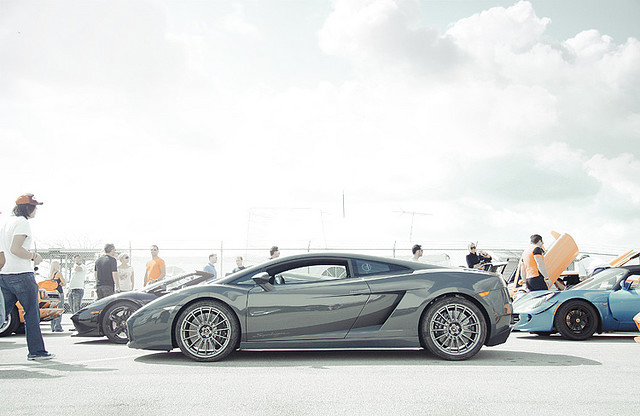
Both of those techniques are pretty popular these days.
The first one gives the look of older photos where the development of the film was heavy on one color or the other. I've got some actions setup in CS5 that can create the look of that, and several variations. I love this look and use it often - it often adds depth to an otherwise flat photo. It's definitely post processing, though. When I get home I'll expound a little.
The second one looks like they were simply shooting into a very bright sky, and that's pretty much the natural ambient light blowing it out. But then they've enhanced the contrast further and lightened/desaturated the picture, but stayed true to the original colors. Also very easy to set up actions in photoshop for this.
Once you've got a look you like, and record actions you can simply apply it to your shots with one click.
Here's a shot I did with a color scheme similar to the first shot, for example:

The first one gives the look of older photos where the development of the film was heavy on one color or the other. I've got some actions setup in CS5 that can create the look of that, and several variations. I love this look and use it often - it often adds depth to an otherwise flat photo. It's definitely post processing, though. When I get home I'll expound a little.
The second one looks like they were simply shooting into a very bright sky, and that's pretty much the natural ambient light blowing it out. But then they've enhanced the contrast further and lightened/desaturated the picture, but stayed true to the original colors. Also very easy to set up actions in photoshop for this.
Once you've got a look you like, and record actions you can simply apply it to your shots with one click.
Here's a shot I did with a color scheme similar to the first shot, for example:
Last edited by Pure Evo; Jan 16, 2012 at 03:24 PM.
Jan 16, 2012 | 04:02 PM
#78

Teamspeed Pro
Joined: Feb 2009
Posts: 2,120
From: Europe
Thanks you guys. Look forward to seeing how you edit your shots Pure Evo!
I gave split toning a little try just now. From what I gather, your settings will most likely be different so it'll be nice to compare the two.
For these pics I adjusted the color balance tones for the shadows as well the contrast and opacity. Not totally happy yet.
Original:

Photoshopped:

I gave split toning a little try just now. From what I gather, your settings will most likely be different so it'll be nice to compare the two.
For these pics I adjusted the color balance tones for the shadows as well the contrast and opacity. Not totally happy yet.
Original:
Photoshopped:
Jan 16, 2012 | 11:28 PM
#79
Teamspeed Pro
Joined: Mar 2009
Posts: 3,224
From: location, location!
This probably should be in some "editing" thread rather than a "photography" thread, but here goes 
To get that color style/look from the first photo above, I'd make an adjustment layer and choose curves in the menu that pops up. (I'll be doing 2 layers as seen in the layer box to combine 2 effects)

Then I go into each channel (R,G,B) and adjust each curve. You can either drag points of the line or click in the box and type in values below in the input/output areas - the bottom left corner is 0,0 and the top right is 255,255.

Then I'd add a second curve adjustment layer and adjust the R,G and B curves on that one too.

Before/After:


I know it's not exactly the same, but that's the way I'd do it. Then you can flatten it and adjust other stuff: contrast, brightness, etc. to taste. I also slightly sharpened the "after" shot.
To get that color style/look from the first photo above, I'd make an adjustment layer and choose curves in the menu that pops up. (I'll be doing 2 layers as seen in the layer box to combine 2 effects)
Then I go into each channel (R,G,B) and adjust each curve. You can either drag points of the line or click in the box and type in values below in the input/output areas - the bottom left corner is 0,0 and the top right is 255,255.
Then I'd add a second curve adjustment layer and adjust the R,G and B curves on that one too.
Before/After:
I know it's not exactly the same, but that's the way I'd do it. Then you can flatten it and adjust other stuff: contrast, brightness, etc. to taste. I also slightly sharpened the "after" shot.
 Editing 104??