


Photography 101

 Feb 11, 2012 | 07:21 PM
#162
Teamspeed Senior Member
Joined: Oct 2011
Posts: 371
From: Connecticut


Tried something new today in photoshop. I was looking for a kind of warm lighting, without making it look too artificial.
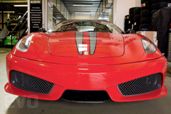
Started off with this picture. I edited the colors, contrast, etc. in Lightroom and in Photoshop Elements 9.

Then, still in Elements 9, I created a duplicate layer, and went to Filter-Render-Lighting Effects.

Once in the "Lighting Effects" menu, I changed the style (the third scroll menu down) to "Omni." Then I put it to the top left corner in the adjuster on the side and made the circle fairly large and intense. The I hit OK.

If you leave it like this, the effect can be a bit overwhelming. Since I made a Duplicate Layer I now adjust the opacity of the layer I made the effect in, until it looks good, I then combine the layer (Ctrl-E) and I'm done. Here's the finally result.

Definitely isn't as good as real studio lights, but still looks pretty good imo, and sure is a lot cheaper and easier than lighting equipment.
Started off with this picture. I edited the colors, contrast, etc. in Lightroom and in Photoshop Elements 9.
Then, still in Elements 9, I created a duplicate layer, and went to Filter-Render-Lighting Effects.
Once in the "Lighting Effects" menu, I changed the style (the third scroll menu down) to "Omni." Then I put it to the top left corner in the adjuster on the side and made the circle fairly large and intense. The I hit OK.
If you leave it like this, the effect can be a bit overwhelming. Since I made a Duplicate Layer I now adjust the opacity of the layer I made the effect in, until it looks good, I then combine the layer (Ctrl-E) and I'm done. Here's the finally result.
Definitely isn't as good as real studio lights, but still looks pretty good imo, and sure is a lot cheaper and easier than lighting equipment.
 Feb 23, 2012 | 09:13 PM
#165
Teamspeed Pro
Joined: Feb 2010
Posts: 1,654
From: The Hammer
Going to the car show this weekend..Got my sb600 speed flash which I didn't have last year. Lighting changes alot in these shows.I'll be shooting in man mode of course, what should my white balance be set at? Do I point the flash right at the car or direct it off to the side? I don't know if these are stupid questions or not? But I gotta ask. Or is it trial and error when it comes to the flash.Now this flash zooms in and out and has different modes.It has a man mode or should I set it just to sync mode? Thanks in advance. 



 Feb 27, 2012 | 09:36 PM
#167

Photographer Extraordinaire
Joined: Aug 2007
Posts: 5,879
From: Bellevue, WA
George, nice job taking those pictures above. I actually think that the second one is better than the first. The positioning is correct and you did a better job of adjusting the contrast and saturation. Keep up the good work.
A group of us got together for a fashion shoot last Saturday at my place. Two photographers and four models. Initially we had no idea what we'd be doing other than taking a few shots on my stairway.

This was essentially an "unplanned" shoot and things were pretty much decided "on the go" and we'd adjust the lighting to suit each "shoot." It's always interesting to see how shooting "styles" differ from one photographer to another. For example, this is my shot.

And then this is a shot by the other photographer, Erik

Same model but different dresses, completely different look and feel. I was going for the "Hollywood starlet" feel while he was going for a modern fashionista look/feel. We both used different setups as far as strobes and lightboxes goes. It really can create a dramatic difference in feel/look when you start throwing in shadows vs lights.
With the same model, I had her go outside and used natural lighting. The only editing for this one was to remove the strap that was showing as well as add a bit of lighting to the model while darkening the background a bit.

Here's an example of how adding a bit of an angle coupled with focusing the light on the model can really create a dramatic feel.

For this image I had a "grid" setup where I'd put a grid screen on the strobe coupled with two strobes with a colored gel in the background. This created a "red" effect for background effect. This really highlighted the focus on the model itself.

I'm still learning about photography when it comes to fashion models so I'm learning as I go along.
A group of us got together for a fashion shoot last Saturday at my place. Two photographers and four models. Initially we had no idea what we'd be doing other than taking a few shots on my stairway.
This was essentially an "unplanned" shoot and things were pretty much decided "on the go" and we'd adjust the lighting to suit each "shoot." It's always interesting to see how shooting "styles" differ from one photographer to another. For example, this is my shot.
And then this is a shot by the other photographer, Erik
Same model but different dresses, completely different look and feel. I was going for the "Hollywood starlet" feel while he was going for a modern fashionista look/feel. We both used different setups as far as strobes and lightboxes goes. It really can create a dramatic difference in feel/look when you start throwing in shadows vs lights.
With the same model, I had her go outside and used natural lighting. The only editing for this one was to remove the strap that was showing as well as add a bit of lighting to the model while darkening the background a bit.
Here's an example of how adding a bit of an angle coupled with focusing the light on the model can really create a dramatic feel.
For this image I had a "grid" setup where I'd put a grid screen on the strobe coupled with two strobes with a colored gel in the background. This created a "red" effect for background effect. This really highlighted the focus on the model itself.
I'm still learning about photography when it comes to fashion models so I'm learning as I go along.
 Feb 28, 2012 | 05:24 PM
#170
Teamspeed Pro
Joined: Jul 2009
Posts: 1,580
From: Connecticut
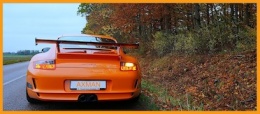
My only thought/critique/suggestion would be in post-processing. It looks like you're going for a bit of a vintage feel here. Personally, I think a little more contrast in this photo (making the car paint a bit darker while lightening the background more) would help it out.
Here, I took your pic into PS and just added a soft light layer (at about 70% opacity). To me this adds a little more 'weight' to the subject, helping it to stand out from the background even more.
It's all a matter of personal preference, but those are my thoughts.
Anyway -- Nice job!

